 Connect Overview
Introduction to Simpology Connect
Simpology Connect APIs provide business partners with API access to Simpology products and feature:
- Loan product management
- Simpology serviceability engine
-
Loan application management
- LIXI - the standards based, recommended approach for passing loan applications to Loanapp for processing.
- Lender lodgement - lodge applications with any one of the many lenders on our panel.
This set of Connect API’s provides complete access to all of this information.
Best of all you get information from all Lenders on a single platform!
API Security
Robust industry standard security is a core strength of the Simpology platform
There are a few easy steps to ensure secure access to API data:
- Retrieve your credentials from the Simpology Admin platform (see below), if you don't have access, give us a call and we will provide credentials for you.
-
Create a
JWT
with the following properties.
aud simpology.passas sub Your API Client Id. iss A short arbitrary string identifying you. iat Unix epoch of creation time. exp Unix epoch of expiry time. This should be a maximum of 1 hour after creation. - Sign the JWT with your API Client Secret.
-
Serialize the JWT, and with every call to the API, add this as a bearer token to the Authorization header. The content of the header should look like
Authorization: Bearer token
Test the API in swagger
For testing in the swagger
- Click the Get JWT button and enter your credentials and click Generate token. The credentials that are initially displayed are for a generic test account.
- Click Copy and return. This will return you to the Swagger page.
- Click Authorize and paste the copied token into the Value text box in the popup widow.
- Click Authorize and Close.
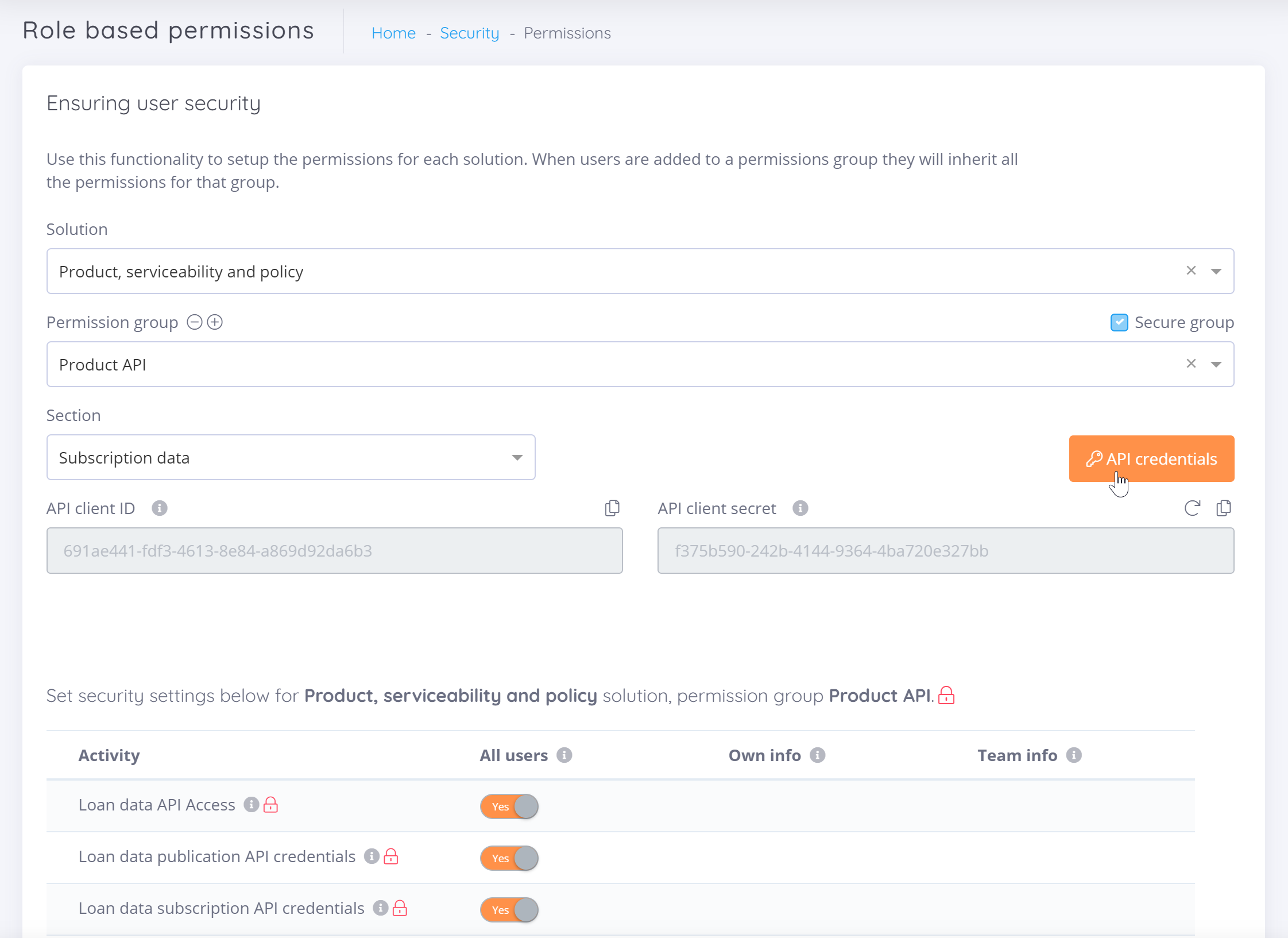
How to retrieve your credentials from the Simpology Admin platform
- Log on to the Simpology Admin portal.
- Navigate to the Account/Security/Permissions page.
- Select the Product, serviceability and policy solution.
- Select the Product API permission group.
- Click the API credentials button.
- The API client Id and API client secret will be displayed, copy these and use for API access. Never email or share this information.
Products introduction
Simpology Connect provides a single source of truth for loan product information. Comprehensive loan data can be managed, published, and subscribed to.
Loan information is managed through the Simpology Admin portal, you can manage your own loan information or simply subscribe to the existing loan data already published on the platform.
Loan information includes:
- Base product information
- All variations of the base product
- All features of the product
- Ongoing and once off fees and charges
- Comparison rates and discount packages
- Documents including PDS and product info
Products overview
A loan product is structured as a base product with a set of variations based on "varying features", plus a number of objects which contain information relating to features, fees, and notes.
As shown below, each lender may have multiple products and each product can have multiple variations.

- Base product information, provides key information enabling identification of the loan, primary loan purpose, and who the lender is.
- The interest rate may vary depending on loan options or features which may be selected. Each adjustment to the interest rate will cause a product variation to be listed. This creates a set of product variations.
- In addition to features which vary the interest rate, features which affect validity are also available, as well as universal features which highlight other benefits of the loan which may be available.
- Depending on which web method is invoked, in addition to the base and full product objects, and object which contains fees, notes and documents will also be provided.
- If discount packages are available from the lender, a discount package will also be returned. Additionally, comparison rates will be provided with and without taking the discount package into account.
Products features
Most loan products have lots of cool features e.g. Offset or redraw accounts, which need to be listed for information and comparative purposes.
Feature functionality is summarised below
Feature enumeration
The Simpology platform provides coverage across all lenders, with varying product structures and features, the platform is highly flexible and allows lenders to name features any way the prefer. In order to ensure loan products can be compared on a like for like basis, an underlying set of feature enumerations is provided so that loans can be readily compared in a consistent and accurate manner.
| Feature | Feature Code | Values |
| Loan amount | LoanAmount | Amount of loan in $. Can specify lower and upper value. |
| LVR | LVR | LVR of loan as %. Can specify lower and upper value. |
| Feature | Feature Code | Options | Option Code |
| Loan purpose - primary | LoanPurposePrimary | Personal | Personal |
| Owner occupied | OwnerOccupied | ||
| Investment | Investment | ||
| Investment residential | InvestmentResidential | ||
| Investment non residential | InvestmentNonResidential | ||
| Business | Business | ||
| Professional investor | ProfessionalInvestor | ||
| Loan Purpose - ABS | LoanPurposeAbs | ABS-125 Purchase of newly erected dwelling - House | ABS125 |
| ABS-127 Purchase of newly erected dwelling - Other dwelling | ABS127 | ||
| ABS-129 Purchase of established dwelling - House | ABS129 | ||
| ABS-131 Purchase of established dwelling - Other dwelling | ABS131 | ||
| ABS-231 Purchase of individual residential blocks of land | ABS231 | ||
| ABS-329 Purchase of land and buildings - Dwellings for rent/resale | ABS329 | ||
| ABS-330 Purchase of land and buildings - Shops | ABS330 | ||
| ABS-331 Purchase of land and buildings - Offices | ABS331 | ||
| ABS-332 Purchase of land and buildings - Industrial buildings (including factories, automotive repair facilities, etc.) | ABS332 | ||
| ABS-333 Purchase of land and buildings - Other non-residential buildings (including hotels, buildings for educational, religious, health, entertainment and recreational purposes) | ABS333 | ||
| ABS-335 Purchase of land and buildings - Rural property | ABS335 | ||
| ABS-336 Purchase of land and buildings - Land for residential block development | ABS336 | ||
| ABS-337 Purchase of land and buildings - Other land purchases | ABS337 | ||
| ABS-121 Construction of dwelling - House | ABS121 | ||
| ABS-123 Construction of dwelling - Other dwelling | ABS123 | ||
| ABS-143 Structural and non-structural alterations and/or additions to dwellings (excluding swimming pools, maintenance, repairs and other home improvements) | ABS143 | ||
| ABS-320 Construction of dwellings for rent/resale | ABS320 | ||
| ABS-321 Construction of non-residential buildings - Shop | ABS321 | ||
| ABS-322 Construction of non-residential buildings - Offices | ABS322 | ||
| ABS-323 Construction of non-residential buildings - Industrial buildings | ABS323 | ||
| ABS-324 Construction of non-residential buildings - Other | ABS324 | ||
| ABS-326 Construction of non-building structures | ABS326 | ||
| ABS-327 Structural and non-structural alterations and/or additions to buildings (excluding maintenance, repairs and other improvements that don't include building work) | ABS327 | ||
| ABS-221 Purchase of motor cars and station wagons - New | ABS221 | ||
| ABS-223 Purchase of motor cars and station wagons - Used | ABS223 | ||
| ABS-225 Purchase of other motor vehicles | ABS225 | ||
| ABS-227 Purchase of motor cycles, scooters | ABS227 | ||
| ABS-229 Purchase of boats, caravans and trailers | ABS229 | ||
| ABS-237 Purchase of household and personal goods | ABS237 | ||
| ABS-241 Travel and holidays | ABS241 | ||
| ABS-340 Wholesale Finance (including purchase of goods by wholesalers or retailers, traders’ stocks held under bailment or floorplan schemes or working capital) | ABS340 | ||
| ABS-341 Purchase of plant and equipment - Motor vehicles (excluding motorcycles, trailers, caravans, trains, boats and planes) | ABS341 | ||
| ABS-342 Purchase of plant and equipment - Other transport equipment (including motorcycles, trailers, caravans, trains, boats and planes) | ABS342 | ||
| ABS-343 Purchase of plant and equipment - Other plant equipment (including construction and earthmoving equipment, agricultural machinery and office equipment) | ABS343 | ||
| ABS-133 Refinance existing home loans - Loans held with other financial institutions | ABS133 | ||
| ABS-239 Debt consolidation (excluding refinance of personal loans) | ABS239 | ||
| ABS-243 Refinance of personal loans (excluding investment loans) | ABS243 | ||
| ABS-248 Refinancing of investment loans (including purchase of dwellings for rent/resale, purchase of shares and other investment assets) | ABS248 | ||
| ABS-348 Refinance of existing commercial loans | ABS348 | ||
| ABS-245 Personal investment in dwellings for rent/resale | ABS245 | ||
| ABS-247 Other personal investment (including shares and other investment assets) | ABS247 | ||
| ABS-249 Other purposes (including swimming pools and home improvements - other than alterations and additions, motor accessories and any other purpose) | ABS249 | ||
| ABS-349 Other purpose (including factoring - whether secured by trade debts or to purchase trade debts, maintenance, repairs and other improvements to property not involving building work) | ABS349 | ||
| Interest type | InterestType | Variable rate | VariableRate |
| Fixed rate | FixedRate | ||
| Fixed term interest type | FixedTermInterestType | Variable rate | Fixed_VariableRate |
| Fixed rate | Fixed_FixedRate | ||
| Repayment option | RepaymentOption | Principal and interest | PrincipalAndInterest |
| Interest only | InterestOnly | ||
| Principal and interest fees | PrincipalAndInterestFees | ||
| Interest capitalised | InterestCapitalised | ||
| Interest in advance | InterestInAdvance | ||
| Fixed term repayment option | FixedTermRepaymentOption | Principal and interest | Fixed_PrincipalAndInterest |
| Interest only | Fixed_InterestOnly | ||
| Principal and interest fees | Fixed_PrincipalAndInterestFees | ||
| Interest capitalised | Fixed_InterestCapitalised | ||
| Interest in advance | Fixed_InterestInAdvance | ||
| Security | Security | Residential property | ResidentialProperty |
| Commercial property | CommercialProperty | ||
| Vacant land | VacantLand | ||
| Rural land | RuralLand | ||
| Industrial property | IndustrialProperty | ||
| Inner city apartment | InnerCityApartment | ||
| Security priority | SecurityPriority | First mortgage | FirstMortgage |
| Registered security | RegisteredSecurity | ||
| Second after DSH | SecondAfterDSH | ||
| Second mortgage | SecondMortgage | ||
| Third mortgage | ThirdMortgage | ||
| Unregistered mortgage | UnregisteredMortgage | ||
| Repayment frequency | RepaymentFrequency | Monthly | Monthly |
| Half monthly | HalfMonthly | ||
| Fortnightly | Fortnightly | ||
| Weekly | Weekly | ||
| Quarterly | Quarterly | ||
| Half yearly | HalfYearly | ||
| Yearly | Yearly | ||
| Loan term | LoanTerm | 1 | Years_1 |
| 2 | Years_2 | ||
| 3 | Years_3 | ||
| 4 | Years_4 | ||
| 5 | Years_5 | ||
| 7 | Years_7 | ||
| 10 | Years_10 | ||
| 15 | Years_15 | ||
| 20 | Years_20 | ||
| 25 | Years_25 | ||
| 30 | Years_30 | ||
| 35 | Years_35 | ||
| Loan reason | LoanReason | Purchase | Purchase |
| Refinance | Refinance | ||
| Variation | Variation | ||
| Debt consolidation | DebtConsolidation | ||
| Cash out | CashOut | ||
| Construction | LoanReason_Construction | ||
| Other | LoanReasonOther | ||
| FurtherAdvance | FurtherAdvance | ||
| Loan type | LoanType | Introductory | Introductory |
| Standard loan | StandardLoan | ||
| Line of credit | LineOfCredit | ||
| Mortgage loan | MortgageLoan | ||
| Term loan | TermLoan | ||
| Bridging | Bridging | ||
| Construction | Construction | ||
| Owner occupied | LoanType_OwnerOccupied | ||
| Vacant land | LoanType_VacantLand | ||
| Equity | Equity | ||
| Investment | LoanType_Investment | ||
| Self managed super fund (SMSF) | SMSF | ||
| Reverse Mortgage | ReverseMortgage | ||
| Chattel mortgage | ChattelMortgage | ||
| Commercial bill | CommercialBill | ||
| Commercial hire purchase | CommercialHirePurchase | ||
| Credit card | LoanType_CreditCard | ||
| Finance lease | FinanceLease | ||
| Invoice financing loan | InvoiceFinancingLoan | ||
| Lease | Lease | ||
| Margin loan | MarginLoan | ||
| Operating lease | OperatingLease | ||
| Other loan | OtherLoan | ||
| Overdraft | Overdraft | ||
| Personal loan | PersonalLoan | ||
| Trade finance loan | TradeFinanceLoan | ||
| Borrower type | BorrowerType | Personal | PersonalBorrower |
| Company | Company | ||
| Trust | Trust | ||
| First home owner | FirstHomeOwner | ||
| Individual | Individual | ||
| Loyalty customer | LoyaltyCustomer | ||
| Fixed Term | FixedTerm | One year | OneYear |
| Two years | TwoYears | ||
| Three years | ThreeYears | ||
| Four years | FourYears | ||
| Five years | FiveYears | ||
| Six years | SixYears | ||
| Seven years | SevenYears | ||
| Eight years | EightYears | ||
| Nine years | NineYears | ||
| Ten years | TenYears | ||
| Six months | SixMonths | ||
| Eighteen months | EighteenMonths | ||
| Three months | ThreeMonths | ||
| DocumentationType | DocumentationType | Low documentation | LowDoc |
| Full documentation | FullDoc | ||
| No documentation | NoDoc | ||
| Alternate documentation | AltDoc | ||
| State | State | New South Wales | NSW |
| Victoria | VIC | ||
| Queensland | QLD | ||
| South Australia | SA | ||
| Western Australia | WA | ||
| Tasmania | TAS | ||
| Australian Capital Territory | ACT | ||
| Northern Territory | NT | ||
| Residency | Residency | Resident | Resident |
| Non-resident | NonResident | ||
| Expatriate | Expatriate | ||
| Credit history | CreditHistory | Clean | Clean |
| Paid defaults | PaidDefaults | ||
| Unpaid defaults | UnpaidDefaults | ||
| Current bankrupt | CurrentBankrupt | ||
| Discharged bankrupt | DischargedBankrupt | ||
| Non-mortgage arrears | NonMortgageArrears | ||
| Mortgage arrears | MortgageArrears | ||
| Repayment method | RepaymentMethod | Australia post | AustraliaPost |
| Bpay | Bpay | ||
| Credit card | Repayment_CreditCard | ||
| Direct debit existing account | DirectDebitExistingAccount | ||
| Direct debit new account | DirectDebitNewAccount | ||
| Direct salary credit | DirectSalaryCredit | ||
| Funds transfer | FundsTransfer | ||
| Lender branch | LenderBranch | ||
| Staff pay | StaffPay | ||
| Post Code | PostCode | List of valid Australian post code(s) | |
| Preliminary interest type | PreliminaryInterestType | Variable rate | Preliminary_VariableRate |
| Fixed rate | Preliminary_FixedRate | ||
| Basic variable rate | Preliminary_BasicVariableRate | ||
| Preliminary fixed term | PreliminaryFixedTerm | One year | Preliminary_OneYear |
| Two years | Preliminary_TwoYears | ||
| Three years | Preliminary_ThreeYears | ||
| Four years | Preliminary_FourYears | ||
| Five years | Preliminary_FiveYears | ||
| Six years | Preliminary_SixYears | ||
| Seven years | Preliminary_SevenYears | ||
| Eight years | Preliminary_EightYears | ||
| Nine years | Preliminary_NineYears | ||
| Ten years | Preliminary_TenYears | ||
| Six months | Preliminary_SixMonths | ||
| Eighteen months | Preliminary_EighteenMonths | ||
| Three Months | Preliminary_ThreeMonths | ||
| Preliminary fixed term repayment option | PreliminaryFixedTermRepaymentOption | Principal and interest | PreliminaryFixed_PrincipalAndInterest |
| Interest only | PreliminaryFixed_InterestOnly | ||
| Principal and interest fees | PreliminaryFixed_PrincipalAndInterestFees | ||
| Interest capitalised | PreliminaryFixed_InterestCapitalised | ||
| Interest in advance | PreliminaryFixed_InterestInAdvance | ||
| Loaders | Loaders | NDIS loader | NDISLoader |
| Annual fee loader | AnnualFeeLoader | ||
| Commercial loader | CommercialLoader | ||
| Expat – standard pricing loader | ExpatStandardPricingLoader | ||
| Sophisticated investor loader | SophisticatedInvestorLoader | ||
| Non metro | NonMetro | ||
| Geo - metro | GeoMetro | ||
| Geo - non metro | GeoNonMetro | ||
| Geo - rural | GeoRural | ||
| Geo - regional | GeoRegional | ||
| Geo - high density | GeoHighDensity | ||
| Geo - inner city | GeoInnerCity | ||
| Geo - high risk | GeoHighRisk | ||
| Risk - bushfire | RiskBushfire | ||
| Risk - flood | RiskFlood | ||
| Risk - commercial | RiskCommercial | ||
| Risk - high risk | RiskHighRisk | ||
| Risk - high density | RiskHighDensity | ||
| Tenure - Seasoned | TenureSeasoned | ||
| Tenure - Starting out | TenureStartingOut | ||
| Any attribute | AnyAttribute | Bridging | AnyAttribute_Bridging |
| Simple refinance | AnyAttribute_SimpleRefinance | ||
| Conditional lending authority | AnyAttribute_CLA | ||
| SMSF Loan | AnyAttribute_SMSFLoan | ||
| Sophisticated investor | AnyAttribute_SophisticatedInvestor | ||
| Topup | AnyAttribute_Topup | ||
| Construction | AnyAttribute_Construction | ||
| Expat | AnyAttribute_Expat | ||
| Commercial | AnyAttribute_Commercial | ||
| Sharia | AnyAttribute_Sharia | ||
| Non resident | AnyAttribute_NonResident | ||
| Foreign income | AnyAttribute_ForeignIncome | ||
| Self employed | AnyAttribute_SelfEmployed | ||
| Company borrowers | AnyAttribute_CompanyBorrowers | ||
| Trust borrowers | AnyAttribute_TrustBorrowers | ||
| All attribute | AllAttribute | Bridging | AllAttribute_Bridging |
| Simple refinance | AllAttribute_SimpleRefinance | ||
| Conditional lending authority | AllAttribute_CLA | ||
| SMSF Loan | AllAttribute_SMSFLoan | ||
| Sophisticated investor | AllAttribute_SophisticatedInvestor | ||
| Topup | AllAttribute_Topup | ||
| Construction | AllAttribute_Construction | ||
| Expat | AllAttribute_Expat | ||
| Commercial | AllAttribute_Commercial | ||
| Sharia | AllAttribute_Sharia | ||
| Non resident | AllAttribute_NonResident | ||
| Foreign income | AllAttribute_ForeignIncome | ||
| Self employed | AllAttribute_SelfEmployed | ||
| CompAll borrowers | AllAttribute_CompAllBorrowers | ||
| Trust borrowers | AllAttribute_TrustBorrowers | ||
| Standard Feature | Feature Code | Options | Option Code |
| Standard features - Without Value | StandardFeaturesWithoutValue | Cheque book | ChequeBook |
| Progressive draw | ProgressiveDraw | ||
| Portability | Portability | ||
| Repayment holiday | RepaymentHoliday | ||
| Parental leave | ParentalLeave | ||
| Split loan | SplitLoan | ||
| Offset | Offset | ||
| Partial offset | PartialOffset | ||
| Rate lock | RateLock | ||
| Credit card | CreditCard | ||
| Debit card | DebitCard | ||
| Deposit book | DepositBook | ||
| Deposit account | DepositAccount | ||
| Bridging finance | BridgingFinance | ||
| Additional repayments | AdditionalRepayments | ||
| LMI required | LMIRequired | ||
| LMI capitalised | LMICapitalised | ||
| LMI available | LMIAvailable | ||
| LMI capitalisation > MaxLVR | LMICapitalisationGreaterThanMaxLVR | ||
| Apply to increase loan amount | ApplyToIncreaseLoanAmount | ||
| Family as guarantor | FamilyAsGuarantor | ||
| Internet banking | InternetBanking | ||
| Interest in advance | SF_InterestInAdvance | ||
| Professional pack | ProfessionalPack | ||
| Telephone banking | TelephoneBanking | ||
| No genuine savings required | NoGenuineSavingsRequired | ||
| Non-conforming | NonConforming | ||
| Standard features - With Value | StandardFeaturesWithValue | Maximum LVR | MaximumLVR |
| Maximum loan amount | MaximumLoanAmount | ||
| Minimum loan amount | MinimumLoanAmount | ||
| Minimum savings | MinimumSavings | ||
| Minimum split amount | MinimumSplitAmount | ||
| Minimum number of splits | MaximumSplits | ||
| Minimum Loan Term | MinimumLoanTerm | ||
| Maximum Loan Term | MaximumLoanTerm | ||
| Maximum number of paid defaults | MaxPaidDefaults | ||
| Maximum value of paid defaults | MaxPaidDefaultValue | ||
| Maximum number of unpaid defaults | MaxUnpaidDefaults | ||
| Maximum value of unpaid defaults | MaxUnpaidDefaultValue | ||
| Value of unpaid defaults ignored | UnpaidDefaultValueIgnored | ||
| Number of months in bankruptcy | BankruptcyMonths | ||
| Number of months bankruptcy discharged | BankruptcyMonthsDischarged | ||
| Period of non-mortgage arrears (months) | NonMortgageArrearsPeriod | ||
| Period of mortgage arrears (months) | MortgageArrearsPeriod | ||
| Maximum yearly additional repayment | MaximumYearlyAdditionalRepayment | ||
| Minimum deposit (%) | MinimimDeposit | ||
| Maximum interest only period (months) | MaximinInterestOnlyPeriod | ||
| Interest only term (months) | InterestOnlyTerm | ||
| Maximum redraw amount per annum | MaximumRedrawAmountPerAnnum | ||
| Minimum redraw amount | MinimumRedraw | ||
| Number of free transactions per month | NumberOfFreeTransactionsPerMonth |
Products feature filters
Several of the API methods that are used to retrieve a list of products, have a product selection filter. The feature filters in the product filter will limit the products returned to those which match them.
The feature filters are described in the table below. Note that if there are multiple filters, only products that match ALL filters will be returned.
| Filter Type | Features | Example | Notes |
| Range | LVR LoanAmount |
{
"featureTypeCode": "LVR",
"lowerValue": 50,
"upperValue": 90
}

{
"featureTypeCode": "LoanAmount",
"lowerValue": 2500000,
"upperValue": 90000000
}
|
If upper value is omitted, it is taken to be unbounded. |
| Selection |
LoanPurposePrimary LoanPurposeAbs InterestType RepaymentOption SecurityPriority Security RepaymentFrequency LoanTerm BorrowerType LoanReason LoanType DocumentationType FixedTermRepaymentOption FixedTerm State PreliminaryInterestType PreliminaryFixedTerm PreliminaryFixedTermRepaymentOption |
{
"featureTypeCode": "State",
"featureOptionCodes": [
"NSW",
"Vic"
]
}
|
Feature option codes must match the feature type. Searches are done against any overlap in the actual feature, so if the search contains NSW and Vic and the feature contains Vic, SA the match succeeds. |
| Std Without Value | StandardFeaturesWithoutValue |
{
"featureTypeCode" :StandardFeaturesWithoutValue",
"standardFeatureOptionCode" : "ChequeBook",
"isPresent" : true
}
|
If IsPresent = true this will include available features, false will exclude these. If IsPresent is omitted, any product that has this feature will be returned. |
| Std With Value | StandardFeaturesWithValue |
{
"featureTypeCode": "StandardFeaturesWithValue",
"standardFeatureOptionCode" : "MaximumLoanAmount",
"value" : "100000"
}
|
|
| Delimited | PostCode |
{
"featureTypeCode": "PostCode",
"value" : "2000,2011,3000,3200"
}
|
Value is a comma delimited set of postcodes. |
Products API Methods
- Data subscription - delivers details of your published data as well as data you have subscribed to.
- Document - returns the list of documents for a lender or a product. There is also a method to stream the document contents.
- Lender - returns a list of all lenders whose products you have subscribed to. Use this data to iterate through lenders to retrieve only the data you require.
- Product - returns either the base product information or the full product details with all associated objects. Also returns the a default product which is a full product object but with only the default variation included, useful for basic loan comparison. The calculator method provides the same outcome as the default method but with the additional advantages of specifying search criteria and of a custom calculated comparison rate based on the actual loan term and loan amount.
- Product details - returns the extra loan product data associated with the selected loan product. This includes, features, fees, and notes. Note that the full product object includes these objects as well.
Please review these methods and their associated data model schemas on the swagger page.
For the object model see the Model page.
Products API Return Codes
The API uses a subset of the standard HTTP return codes. The codes that are used are:
| 200 | Success | |
| 400 | Bad Request |
The request parameters or body are invalid. Further information is returned in a JSON object in the contents, as in the following example:
{
"type": "https://tools.ietf.org/html/rfc7231#section-6.5.1",
"title": "One or more validation errors occurred.",
"status": 400,
"traceId": "|eed66cfc-4e2be9c306e8a251.",
"errors": {
"LVR": [
  	"UpperValue must be greater than LowerValue"
]
}
}
Note that this can contain more than one error.
|
| 401 | Unauthorized | The authorization header is missing or has an invalid token. |
| 403 | Forbidden | The authorization token is present and correct, but the associated permission group does not have the authority to perform the requested operation. |
Serviceability overview
Provide third party services as PASSASS.
- PAYG Income
- Self Employed
- Not Employed
- Company and Trust
- Rental Income
- Mortgage Liability
- Other Liability
- CALC PAIncome
- Household Expenses
Serviceability API Methods
- Serviceability - Returns a list of all available serviceability calculators, Returns the result of the serviceability calculation.
- Serviceability - returns the list of documents for a lender or a product. There is also a method to stream the document contents.
- Serviceability Config - Returns a list of all available metrics or by selected set.
Please review these methods and their associated data model schemas on the swagger page.
For the object model see the Model page.
Serviceability API Return Codes
The API uses a subset of the standard HTTP return codes. The codes that are used are:
| 200 | Success | |
| 400 | Bad Request |
The request parameters or body are invalid. Further information is returned in a JSON object in the contents, as in the following example:
{
"type": "https://tools.ietf.org/html/rfc7231#section-6.5.1",
"title": "One or more validation errors occurred.",
"status": 400,
"traceId": "|eed66cfc-4e2be9c306e8a251.",
"errors": {
"LVR": [
  	"UpperValue must be greater than LowerValue"
]
}
}
Note that this can contain more than one error.
|
| 401 | Unauthorized | The authorization header is missing or has an invalid token. |
| 403 | Forbidden | The authorization token is present and correct, but the associated permission group does not have the authority to perform the requested operation. |
LIXI Application Management overview
These LIXI compatible APIs to handle CRUD operations (create, read, update and delete) for loan applications originating from a CRM system. Expected data formats are CAL/CNZ 2.6.x or greater.
- Create a new application in Loanapp
- Open an existing application in Loanapp
- Copy an existing application into a new one with a new identifier.
- Delete an application from Loanapp.
- Query the applications stored in Loanapp.
- Change sales channel or the application name.
- Provide the status of the application.
LIXI Application Management API Methods
- Create Application - Create a new application in Loanapp.
- Open Application - Open an existing application in Loanapp.
- Copy Application - Copy an existing application into a new one with a new identifier.
- Delete Application - Delete an application from Loanapp.
- List Applications - Query the applications stored in Loanapp.
- Update Application - Change sales channel or the application name.
- Application status - Provide the status of the application.
Please review these methods and their associated data model schemas on the swagger page.
For the object model see the Model page.
LIXI Application Management API Return Codes
The API uses a subset of the standard HTTP return codes. The codes that are used are:
| 200 | Success | |
| 201 | Created | |
| 204 | No Content | |
| 400 | Bad Request |
The request parameters or body are invalid. Further information is returned in a JSON object in the contents, as in the following example:
{
"type": "https://tools.ietf.org/html/rfc7231#section-6.5.1",
"title": "One or more validation errors occurred.",
"status": 400,
"traceId": "|eed66cfc-4e2be9c306e8a251.",
"errors": {
"LVR": [
  	"UpperValue must be greater than LowerValue"
]
}
}
Note that this can contain more than one error.
|
| 401 | Unauthorized | The authorization header is missing or has an invalid token. |
| 403 | Forbidden | The authorization token is present and correct, but the associated permission group does not have the authority to perform the requested operation. |
| 404 | Not Found | |
| 415 | Invalid Content Type |
LITE Application Management overview
Support for managing lite applications. Lite applications have much smaller data model compared to full featured LIXI or LADM applications. APIs for managing applicants, documents and CRUD operations (create, read, update and delete) for loan applications.
- Create a new application in Loanapp
- Delete an application from Loanapp.
- Update an existing application details in Loanapp.
- Create a new applicant in Loanapp.
- Get applicants from Loanapp.
- Create new management persons in Loanapp.
- Get templates from Loanapp.
- Save document for an application.
LITE Application Management API Methods
- LITE - Provides application, applicant, document CRUD operations for lite loan applications.
Please review these methods and their associated data model schemas on the swagger page.
For the object model see the Model page.
LITE Application Management API Return Codes
The API uses a subset of the standard HTTP return codes. The codes that are used are:
| 200 | Success | |
| 400 | Bad Request |
The request parameters or body are invalid. Further information is returned in a JSON object in the contents, as in the following example:
{
"type": "https://tools.ietf.org/html/rfc7231#section-6.5.1",
"title": "One or more validation errors occurred.",
"status": 400,
"traceId": "|eed66cfc-4e2be9c306e8a251.",
"errors": {
"LVR": [
  	"UpperValue must be greater than LowerValue"
]
}
}
Note that this can contain more than one error.
|
| 401 | Unauthorized | The authorization header is missing or has an invalid token. |
| 403 | Forbidden | The authorization token is present and correct, but the associated permission group does not have the authority to perform the requested operation. |
LADM Application Management overview
Get a LADM application in JSON format.
LADM Application Management API Methods
- LADM - Returns details of LADM application.
Please review these methods and their associated data model schemas on the swagger page.
For the object model see the Model page.
LADM Application Management API Return Codes
The API uses a subset of the standard HTTP return codes. The codes that are used are:
| 200 | Success | |
| 400 | Bad Request |
The request parameters or body are invalid. Further information is returned in a JSON object in the contents, as in the following example:
{
"type": "https://tools.ietf.org/html/rfc7231#section-6.5.1",
"title": "One or more validation errors occurred.",
"status": 400,
"traceId": "|eed66cfc-4e2be9c306e8a251.",
"errors": {
"LVR": [
  	"UpperValue must be greater than LowerValue"
]
}
}
Note that this can contain more than one error.
|
| 401 | Unauthorized | The authorization header is missing or has an invalid token. |
| 403 | Forbidden | The authorization token is present and correct, but the associated permission group does not have the authority to perform the requested operation. |
Broker overview
Get broker by id or email.
Broker API Methods
- Broker - Returns a broker details.
Please review these methods and their associated data model schemas on the swagger page.
For the object model see the Model page.
Broker API Return Codes
The API uses a subset of the standard HTTP return codes. The codes that are used are:
| 200 | Success | |
| 400 | Bad Request |
The request parameters or body are invalid. Further information is returned in a JSON object in the contents, as in the following example:
{
"type": "https://tools.ietf.org/html/rfc7231#section-6.5.1",
"title": "One or more validation errors occurred.",
"status": 400,
"traceId": "|eed66cfc-4e2be9c306e8a251.",
"errors": {
"LVR": [
  	"UpperValue must be greater than LowerValue"
]
}
}
Note that this can contain more than one error.
|
| 401 | Unauthorized | The authorization header is missing or has an invalid token. |
| 403 | Forbidden | The authorization token is present and correct, but the associated permission group does not have the authority to perform the requested operation. |
Info Request overview
Send or get info request details or template.
- Send info request.
- Send info request from template.
- Get info request documents.
- Get info request templates.
- Get info request status.
Info Request API Methods
- InfoRequestExternal - Send or get info request details or template.
Please review these methods and their associated data model schemas on the swagger page.
For the object model see the Model page.
Info Request API Return Codes
The API uses a subset of the standard HTTP return codes. The codes that are used are:
| 200 | Success | |
| 400 | Bad Request |
The request parameters or body are invalid. Further information is returned in a JSON object in the contents, as in the following example:
{
"type": "https://tools.ietf.org/html/rfc7231#section-6.5.1",
"title": "One or more validation errors occurred.",
"status": 400,
"traceId": "|eed66cfc-4e2be9c306e8a251.",
"errors": {
"LVR": [
  	"UpperValue must be greater than LowerValue"
]
}
}
Note that this can contain more than one error.
|
| 401 | Unauthorized | The authorization header is missing or has an invalid token. |
| 403 | Forbidden | The authorization token is present and correct, but the associated permission group does not have the authority to perform the requested operation. |
Powered by Simpology Pty Ltd © 2025